 GAIK
GAIKNo-Code Assets
Prompt templates and reusable agent skills for rapid use-case setup
No-code assets are the fastest way to deploy a GenAI capability without writing code. They package domain knowledge, task instructions, and business rules into reusable templates and skill folders that any team member can configure and run. Business users can adapt them to their own terminology and reporting formats; developers can use them as a starting point before scaling to full software components or modules.
Start here when you want to validate a use case quickly or deploy a working solution without custom development. When you need more control over processing logic, the same workflow can be scaled to software components or modules.
Overview
| Asset type | Best for | Typical outputs |
|---|---|---|
| Prompt Templates | Fast, prompt-driven use-case validation | Structured outputs from voice or text input |
| Agent Skills | Fully packaged, ready-to-run use-case workflows | Complete skill deployments with sample data and setup |
How No-Code Assets Fit In
Prompt Templates
Prompt templates encode a specific task as a reusable, configurable prompt. Each template defines what the LLM should do, what rules to apply, and what the output must look like — acting as a digital reporting policy that any user can invoke. A template contains three elements: task instructions specifying what to extract or generate, business rules encoding allowed values and edge-case handling, and sample data for immediate testing and validation. Teams can adapt them to new domains simply by editing field names and allowed values, with no code changes required.
Example: A safety manager takes the incident-report prompt template, updates the severity categories to match their company's five-tier classification, and pastes it into their AI assistant. Site workers dictate voice notes on their phones; the template extracts event type, location, time, severity, and immediate actions — returning a completed incident report in seconds, without any developer involvement.
Key features:
- Self-contained prompt packs with task instructions, rules, and sample data
- Adaptable to new domains by editing field names and allowed values
- Validate the use case quickly before committing to a full implementation
Available prompt packs:
- Construction diary creation
- Incident report writing
- Purchase-order processing
- Safety observation reporting
Potential applications:
-
Rapid prototyping of reporting and data capture workflows
-
Deploying structured extraction in teams without developer support
-
Domain adaptation of existing use cases (e.g. adapting incident reporting to a new industry)
-
Piloting GenAI capabilities before investing in software development
-
Use them: Prompts in the demo app — copy a prompt, or copy it and open ChatGPT or Claude in one click
-
Assets path: implementation_layer/no-code-assets/prompts
Agent Skills
Agent skills are fully self-contained, ready-to-run solution packages for a specific use case. Each skill folder includes task instructions, prompt resources and supporting workflow artifacts, plus setup scripts and sample data where the use case needs them — everything required to deploy and run the use case out of the box. Unlike prompt templates, which are single prompts for manual use, agent skills are structured for direct operational deployment in Claude Desktop or similar AI environments. They are domain-adaptable by editing reference files: update field names, pricing rules, or output formats to match your organization without rewriting logic.
Example: A procurement team installs the purchase-order-processing skill and places their company's price list in the order folder's
price_list/subfolder. Claude reads an incoming purchase order and bills of material, matches material numbers, looks up prices, applies volume discounts, and saves a complete sales order document — all triggered by a single natural-language request: "Process the PO in this folder."
Key features:
- Fully packaged — includes prompts, sample data, setup scripts, and supporting files
- Deployable without custom software development
- Domain-adaptable by editing reference files and allowed values
Available skill packs:
- Construction diary creation
- Incident report writing
- Purchase-order processing
- Report writing
- Brief to slides (presentation generation)
Every skill is a folder under agent-skills/skills/ with a SKILL.md that the agent follows and a README.md that explains what the skill does and how to set it up.
Potential applications:
-
Operational deployment of incident and safety reporting in industrial settings
-
On-site field work diary automation for construction and maintenance teams
-
Purchase order capture and validation in procurement workflows
-
Structured report generation for management and compliance purposes
-
Rapid use-case delivery in organizations without dedicated AI development teams
-
Use them: Agent skills in the demo app — download a skill as a .zip and open a ready-made "try this" prompt in Claude
-
Assets path: implementation_layer/no-code-assets/agent-skills
Skills for coding agents
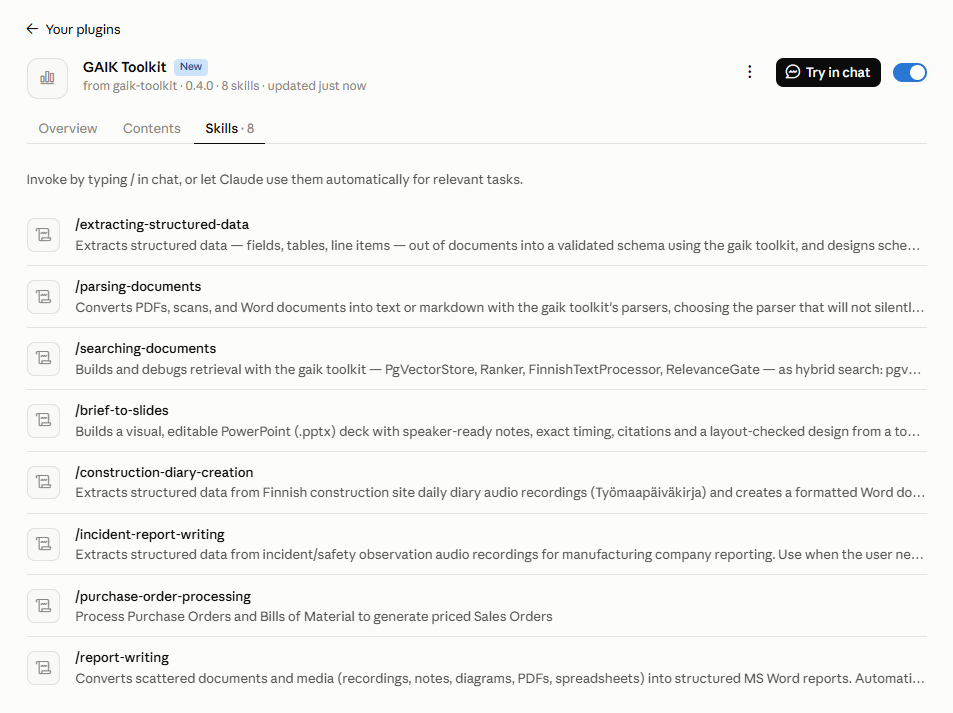
The agent-skills folder is also a plugin in the Agent Plugins format, so one install brings every skill in it: the use-case skills above and four skills for developers building document pipelines with the gaik package: parsing documents, extracting structured data, searching documents and generating structured reports. The last one runs the gaik report writer from an agent that can run Python, so every statement in the report traces to a verified quote from the user's files. The developer skills carry the decisions and failure modes that are expensive to rediscover, such as which parser keeps a table's structure or why a hybrid search quietly became vector-only.
Claude Desktop and claude.ai. The repository is a plugin marketplace, so Claude installs it straight from GitHub:
-
Open Customize → Plugins, select Add, then Add marketplace and Add from a repository.
-
Enter
GAIK-project/gaik-toolkitand select Sync. Leave Sync automatically on to receive updates.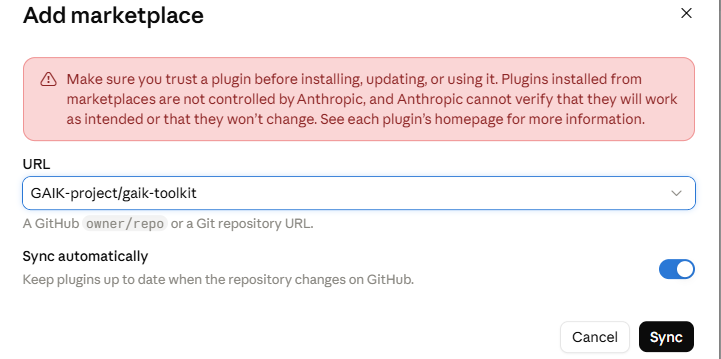
-
On the Discover tab, select Add next to Gaik toolkit.
The plugin then lists its skills. Claude uses them when a task calls for one, or you can start one by typing / in a chat.
Claude Code, Codex and Copilot CLI add the same marketplace from the command line:
# Claude Code
/plugin marketplace add GAIK-project/gaik-toolkit
/plugin install gaik-toolkit@gaik-toolkit

# Codex
codex plugin marketplace add GAIK-project/gaik-toolkit
codex plugin add gaik-toolkit@gaik-toolkit

# Copilot CLI
copilot plugin marketplace add GAIK-project/gaik-toolkit
copilot plugin install gaik-toolkit@gaik-toolkit
The plugin README covers VS Code, ChatGPT workspaces and clients without plugin support.
📁 No-code assets root: implementation_layer/no-code-assets