 GAIK
GAIKConstruction Site Diary Creation
Automated daily site documentation from voice recordings and field observations into structured, standardized construction diaries.
Construction Site Diary Creation Generic Use Case (Cross-Cutting Use Case)
This use case demonstrates how the GAIK toolkit converts spoken field observations, daily activity reports, and site notes into complete, structured construction site diaries — eliminating manual transcription and form-filling while keeping supervisors and site managers in control of the final record.
Business layer – use case specification
At the business layer, the use case targets construction projects where daily site diaries are a legal and operational requirement. Site supervisors and foremen must document daily activities, workforce, weather conditions, work phases, and observations — a time-consuming process that is typically done at the end of a long workday from memory. Errors, omissions, and delays in diary completion create compliance risks and make it harder to track project progress. The AI-supported workflow allows field workers to record observations by voice throughout the day and converts them into a structured, standardised diary entry ready for review and submission.
Concrete example fragments reflected in the use case design include:
- Site supervisors record daily observations by voice — either by uploading an audio file or recording directly in the browser — on a mobile device or tablet during or after work
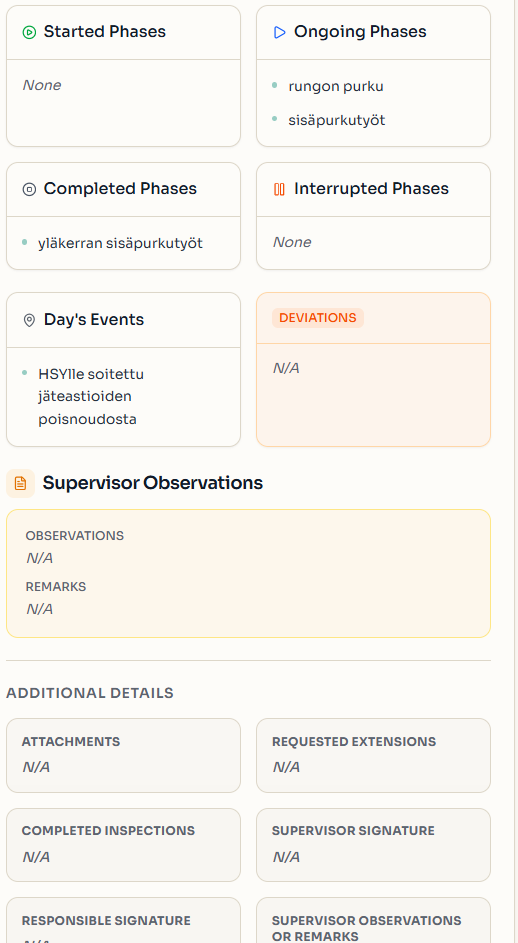
- The diary must capture work phases (started, ongoing, completed, interrupted), personnel, weather, and any inspections or extensions
- Manual form completion is slow, inconsistent, and prone to missing information
- The structured output must align with the organisation's standard diary format and be ready for PDF export and archival
- Success is defined as complete, consistently structured diaries produced with minimal manual effort
The canvas clarifies the purpose of the solution, the main users (site supervisors, foremen, project managers, and QA teams), and the expected outcomes.
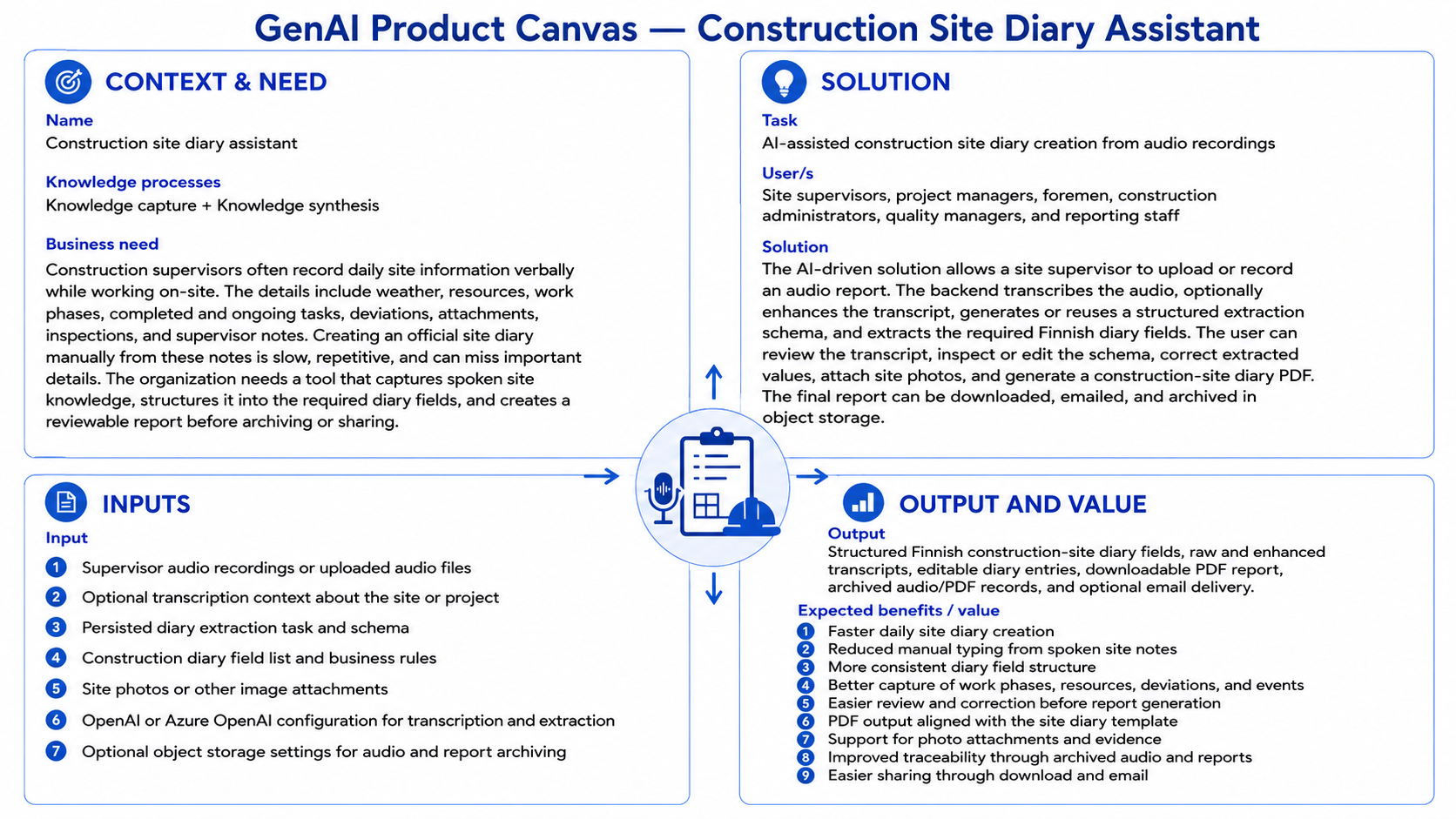
- Reference GenAI Product Canvas for Construction Site Diary Creation — Download (diary-canvas.png)
The BPMN process model shows how this use case runs: who performs each step (the people involved and the GenAI tool), and which documents and data move between the steps.
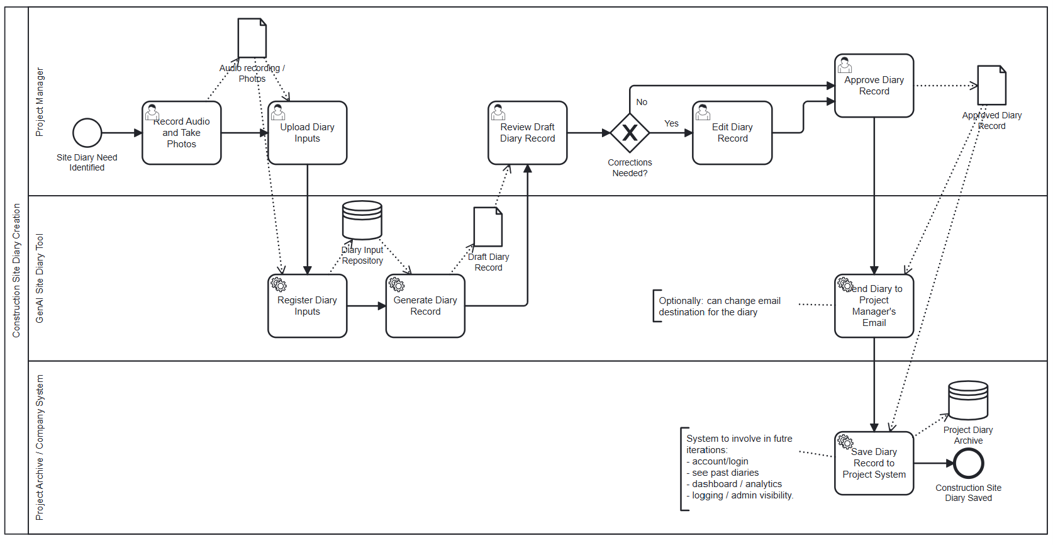
- Reference BPMN process model for Construction Site Diary Creation — Download (diary-bpmn.png)
Strategy layer – value evaluation and monitoring
At the strategy layer, the value evaluation model applies the Value Evaluation Framework to this generic use case and makes value assumptions explicit.
Example value fragments from the model include:
Functional value (primary): "Faster diary completion", "Consistent field structure", "Voice-to-diary without manual typing", "Automated work phase tracking", "Accurate capture of personnel and subcontractors" → Outcome: More complete and consistent site diaries produced with less effort
Informational value: "Structured, searchable project records", "Better visibility into daily site progress", "Reliable audit trail for compliance", "Consistent data for project analytics" → Outcome: Better project oversight and faster access to accurate site information
Emotional value: "Less end-of-day documentation stress", "Higher confidence in diary completeness", "Reduced frustration with manual forms" → Outcome: Happier site teams and smoother daily workflows
Social value: "Better information sharing between site and office", "Clearer handovers between supervisors", "More consistent communication with inspectors and clients" → Outcome: Stronger collaboration and reduced misunderstandings across project stakeholders
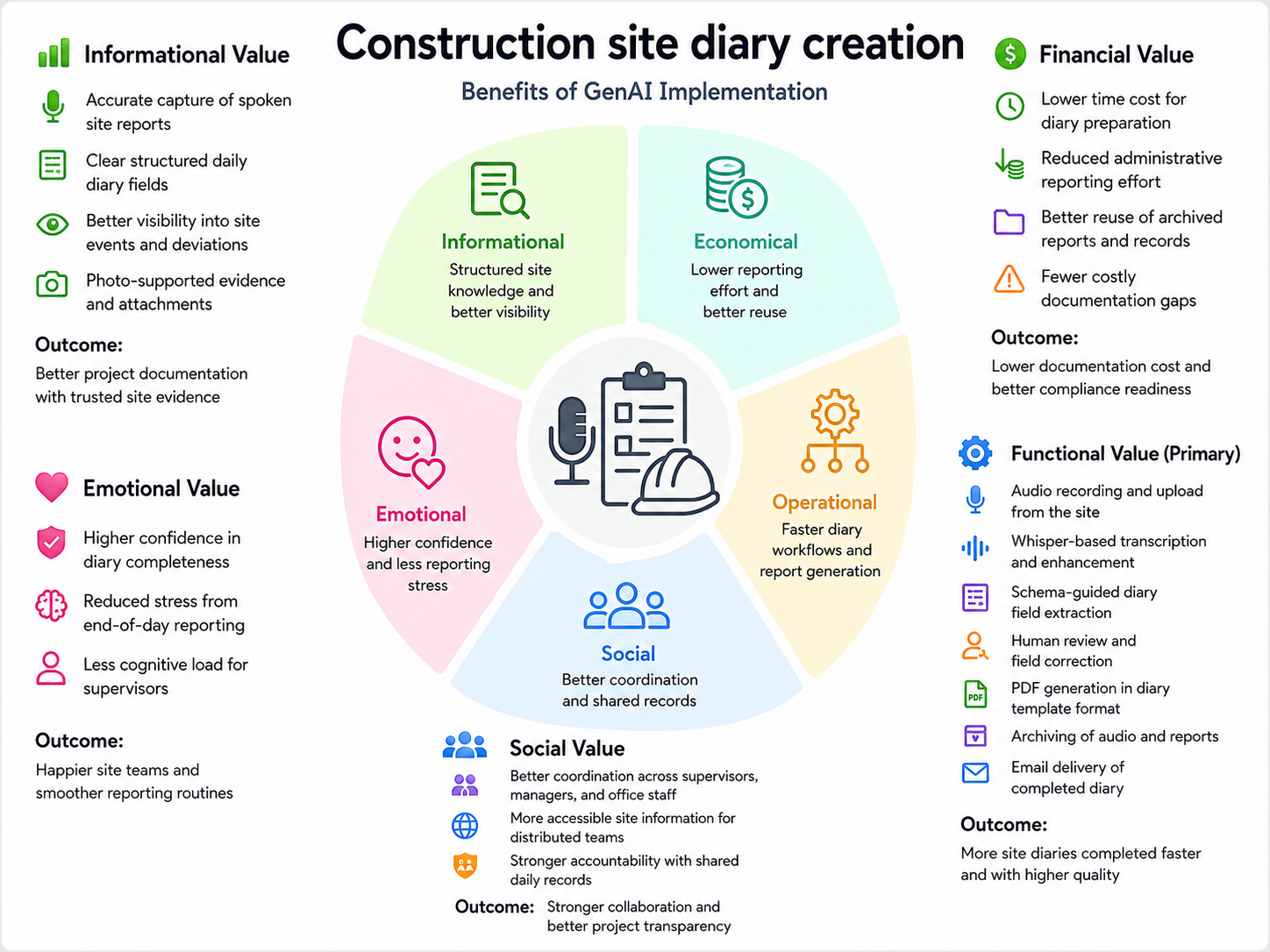
- Reference Value Evaluation Model for Construction Site Diary Creation — Download (diary-value.png)
The same model can be used both before implementation (to evaluate expected value) and after deployment (to monitor realized value across different dimensions).
Implementation layer using No-Code
Construction site diary creation can be supported by Generative AI using a no-code prompt-based approach. At the implementation layer, the use case is realized using a ready-made extraction prompt from the toolkit:
The prompt converts a spoken audio transcript into a strict JSON object covering all 20 required diary fields — site address, date, personnel, work phases, events, supervisor notes, and signatures. It can be pasted directly into ChatGPT, Claude.ai, or Gemini, or set up as a Custom GPT for repeated daily use.
What the business user sets up (once):
A site supervisor copies the prompt from prompt.txt and optionally sets it up as a Custom GPT or saved conversation. The prompt defines:
- All 20 diary fields with extraction rules and format requirements
- A fixed list of allowed work phase values (started / ongoing / completed / interrupted)
- Anti-hallucination guardrails (only extract what is explicitly stated; leave fields blank otherwise)
What happens in daily work:
Step 1 – Record a voice note The supervisor records a short spoken summary of the day's events on a mobile device — work tasks, personnel, weather, work phases, and any observations.
Step 2 – Transcribe and extract Paste the transcript into the AI assistant along with the prompt. The assistant extracts all diary fields and returns a structured JSON object plus a readable summary table.
Example of what the business gets out:
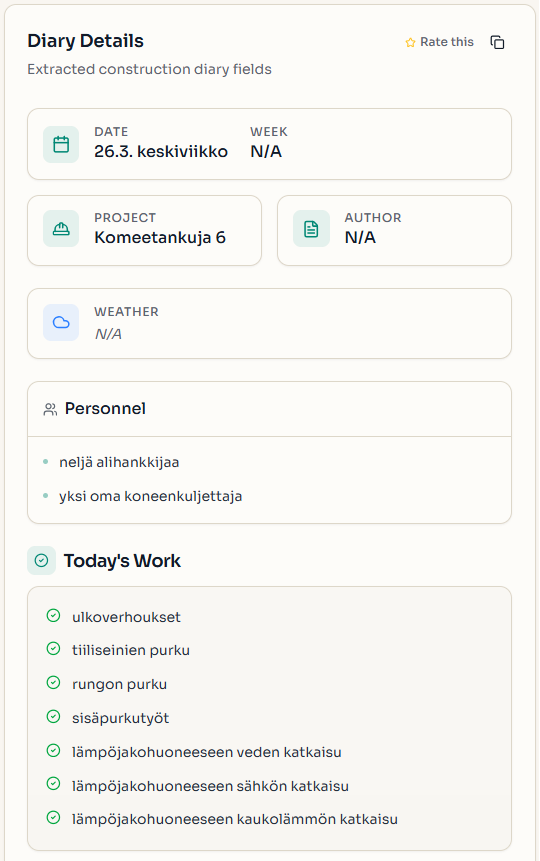
The output is a ready-to-review structured diary entry with all form fields populated:
- Kohde (site address): as stated
- Päivämäärä: dd.mm.yyyy
- Resurssit – Henkilöstö: Työnjohtajat: N hlö, Työntekijät: N hlö, Alihankkijat: N hlö, Yhteensä: N hlö
- Päivän työt: brief task keywords
- Käynnissä olevat työvaiheet: e.g. sisäpurku, rungon purku
- Valvojan huomiot: key observations if stated
This makes the result:
- easy to paste into the official diary form or a digital system
- safe to store as a structured record for compliance and audit
- reliable as input to the PDF generation step in the code-based pipeline
- suitable for daily project reporting and handover documentation
Implementation Layer Using Code-Based Method.
Two software components — Transcriber (with an optional AI enhancement step) and Extractor — are combined into the Audio to Structured Data module to handle this use case end-to-end. The resulting structured diary fields feed into downstream tasks — primarily PDF report generation — that are outside the GenAI pipeline.
Software Components
1. Transcriber
Converts a voice recording of site observations into text using a configurable speech-to-text backend, with an optional enhancement step that corrects speech artefacts and improves readability. Site supervisors can record a spoken summary of the day's activities on a mobile device; the Transcriber produces a clean transcript ready for structured extraction.
📁
implementation_layer/src/gaik/software_components/transcriber/
2. Extractor
Takes the transcript and a plain-language field specification and returns structured diary data. Internally it runs three steps: the Requirement Parser identifies the diary fields from the plain-language description; the Schema Generator builds a typed data schema; the Data Extractor uses an LLM to fill each field from the transcript.
The schema is generated once and saved for reuse — future diary entries skip regeneration entirely, making the daily workflow fast and consistent.
📁
implementation_layer/src/gaik/software_components/extractor/
Downstream tasks
Once the Extractor produces the structured diary entry, the result feeds into downstream tasks that are outside the GenAI pipeline and specific to each organisation's reporting and documentation requirements.
PDF report generation is the primary downstream step for this use case. It takes the structured diary fields and renders them into a formatted, standardised daily site diary document. The layout, branding, and field presentation depend on the organisation's template and may require customisation.
After report generation, the structured result can be passed to any further step:
- Generate a formatted site diary PDF — render the structured fields into a professional daily diary document using a template engine or PDF library
- Email the report to stakeholders — send the generated PDF directly to the supervisor, project manager, or client via SMTP; the use case supports authenticated email delivery through identity providers
- Archive to cloud storage — upload both the audio recording and the generated PDF to S3-compatible object storage for long-term archival and later retrieval
- Store in a project management system — persist the structured diary record for progress tracking, analytics, and project handovers
Defining What to Extract: User Requirements
Fields are specified in plain language — no code, no schema configuration. The field specification below covers the standard construction site diary format:
Extract the following fields from the construction diary:
- Project or site name
- Author or supervisor name
- Date and week number
- Weather conditions
- Personnel and subcontractors
- Day's work tasks
- Day's events
- Started work phases
- Ongoing work phases
- Completed work phases
- Interrupted work phases
- Supervisor observations or remarks
- Attachments, inspections, and requested extensions if mentioned

Output rules:
- Return every schema field.
- For missing or not stated values, always return "".
- Keep wording close to the source when possible.
The Schema Generator parses this description into a typed Pydantic model and saves both the model code (schema.py) and the parsed requirements (schema_requirements.json). Subsequent diary entries reuse the cached schema — no re-parsing required. The extraction task can also be edited directly in the application UI before running extraction, making it easy to adjust field definitions for different project types without modifying code.
Software Module: Audio to Structured Data
Packages both components into a single workflow. Provide a voice recording and field requirements — the module returns transcripts, structured diary fields, and the reusable schema.
Example output from the demo — entering a voice recording and viewing the structured diary entry with extracted fields:
📁
implementation_layer/src/gaik/software_modules/audio_to_structured_data/
To test the construction site diary creation use case, please visit the GAIK demo link. Access is available upon registration request.
Adaptable to Other Domains
The same pipeline applies to any domain requiring structured daily or periodic records from spoken observations — only the User Requirements definition changes:
- Health and safety inspection reports, environmental monitoring logs, quality control checklists, facility maintenance records, field service reports
Evaluation Methods
The quality of this use case is evaluated at two levels: the GAIK software components (transcription and extraction) are assessed independently.
Transcription Evaluation
Transcription quality is measured using Word Error Rate (WER) and related metrics (Character Error Rate, Spelling Error Rate, Substitution/Deletion/Insertion rates), comparing the AI-generated transcript against a verified reference. The evaluation also benchmarks the benefit of the two-pass enhancement step.
📊 Transcription evaluation methods:
evaluation_layer/eval_methods/transcription_eval/
Extraction Evaluation
The quality of structured field extraction is evaluated using precision, recall, and F1 score — computed separately for exact-match fields (dates, names, categorical values) and semantic-match fields (descriptive text such as work tasks and observations). This measures how accurately the extracted fields match the expected values across a set of reference diary recordings.
📊 Extraction evaluation methods:
evaluation_layer/eval_methods/extraction_eval/
Related Resources
Semantic Video Search
Natural language search across indexed video content with direct jump-to-moment navigation and multilingual retrieval.
Safety Observation Reporting
AI-powered safety observation reporting from audio or text input into structured, standardized incident records ready for review and export.