 GAIK
GAIKPurchase Order Processing
Automated purchase order extraction and priced sales-order generation using AI-powered parsing and schema-guided extraction.
Purchase Order Processing Generic Use Case (Cross-Cutting Use Case)
The purchase order processing use case shows how the GAIK toolkit turns incoming customer purchase orders (PDFs, scanned documents, and accompanying bills of material) into structured, priced sales orders ready for review and ERP intake, eliminating repetitive manual reading, matching, and arithmetic.
Business layer – use case specification
At the business layer, the use case targets the manual workflow that follows a customer purchase order arriving by email or portal upload. Operations staff must read each document, look up every line item against internal material records and price lists, apply conditional fees, and assemble a sales order to be entered into the system. The GAIK pipeline replaces the manual reading, matching, and arithmetic steps with a single automated pass while leaving the reviewer in control of the final output.
Concrete example fragments reflected in the use case design include:
- Purchase orders arrive as PDFs, scanned documents, or email attachments with varying layouts from different customers
- The purchase order could be in a single PDF, or with accompanying bill of materials (BoMs)
- If accompanied by BoMs, each line item in the purchase order links to a bill of material via a material number, and pricing requires matching that material against a master price list
- Conditional fees — cutting, testing, certification — apply per line only when the BOM flags them as required
- Success is defined as faster order handling, reduced data entry errors, consistent pricing, and an audit-ready calculation breakdown
The canvas clarifies the purpose of the solution, the main users (order handling staff, customer service, procurement, operations, and finance teams), and the expected outcomes.

- Reference GenAI Product Canvas for Purchase Order Processing — Download (po-canvas.png)
The BPMN process model shows how this use case runs: who performs each step (the people involved and the GenAI tool), and which documents and data move between the steps.
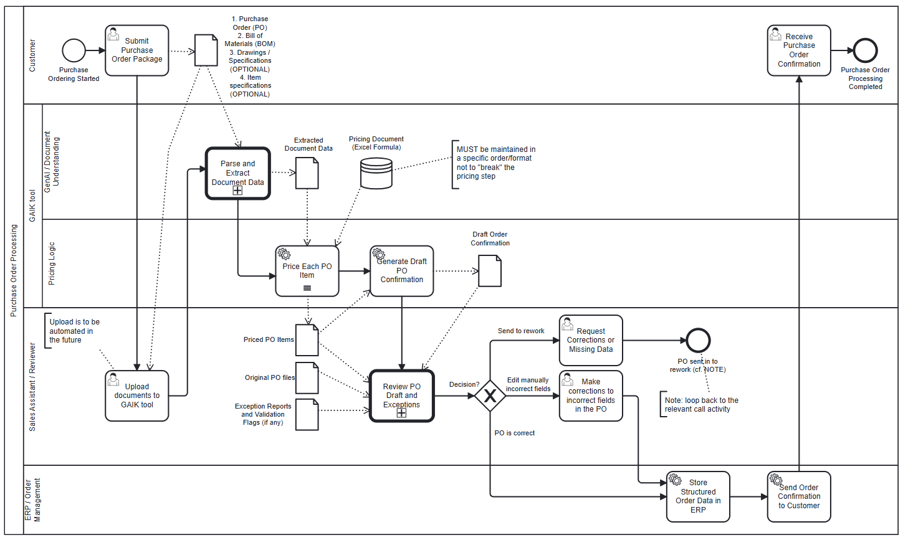
- Reference BPMN process model for Purchase Order Processing — Download (po-bpmn.png)
Strategy layer – value evaluation and monitoring
At the strategy layer, the value evaluation model for purchase order processing applies the Value Evaluation Framework to this generic use case and makes value assumptions explicit.
Example value fragments from the model include:
Functional value (primary): "Faster PO processing", "Consistent data extraction", "Validation and compliance checks", "Easy integration with ERP systems", "Audit trail and traceability" → Outcome: More purchase orders processed faster and with higher quality
Informational value: "Accurate PO data capture", "Real-time visibility", "Fewer errors and exceptions", "Better data for analysis" → Outcome: Better decisions with trusted data
Financial value: "Lower material processing cost", "Reduced data entry errors", "Faster cash-to-cycle", "Early payment discounts captured" → Outcome: Reduced operating costs and better financial performance
Emotional value: "Increased satisfaction and trust", "Less stress and frustration", "More confidence in data" → Outcome: Happier teams and higher engagement
Social value: "Better collaboration across teams", "Stronger supplier relationships", "Promotes transparency and fairness" → Outcome: Stronger partnerships and reputation
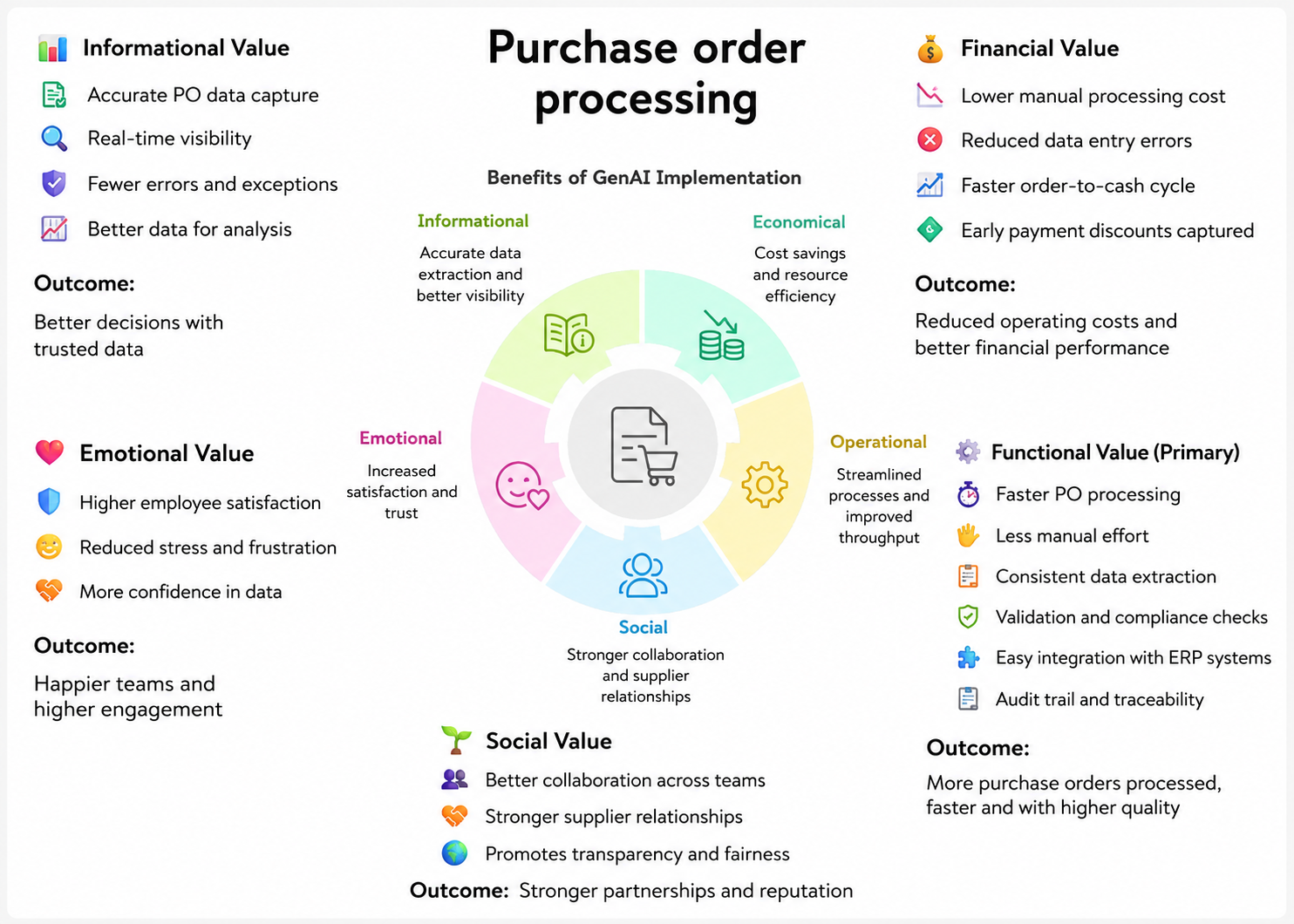
- Reference Value Evaluation Model for Purchase Order Processing — Download (po-value.png)
The same model can be used both before implementation (to evaluate expected value) and after deployment (to monitor realized value across different dimensions).
Implementation layer using No-Code
Purchase order processing can be supported by Generative AI using two no-code approaches: a prompt-based approach for quick experimentation directly in ChatGPT, and a Claude Skill for a more structured, repeatable workflow in Claude Desktop.
Prompt-based approach
The toolkit provides two ready-to-use prompts that can be copied and pasted directly into ChatGPT along with your documents — no setup or installation required.
- Single-document PO prompt — for purchase orders that contain all required information in one PDF. Upload the PO and the price list, paste the prompt, and receive a structured JSON output with extracted fields, matched pricing, and calculated totals.
- Multi-document PO prompt — for purchase orders accompanied by one or more Bill of Material PDFs. Upload the PO, all BOMs, and the price list together; the prompt cross-references them by material number and returns an enriched JSON with BOM-derived technical details and calculated pricing.
Both prompts include price list matching, per-line cost calculation (material cost, cutting, testing, certification fees), volume discount, and tax computation. Sample purchase orders, BOMs, and price lists are included to try the prompts immediately.
Claude Skill
The toolkit also provides a Claude Skill for purchase order processing — a declarative, reusable workflow that runs inside Claude Desktop. The skill defines the extraction fields, BOM matching logic, pricing rules, and output format in plain-text reference files. A user points Claude at a folder containing the PO, BOMs, and price list, and Claude produces a formatted sales order document with a full calculation audit trail.
The Claude Skill is better suited for repeated use on a defined order format, while the prompt-based approach is more flexible for ad-hoc or one-off orders.
For a detailed walkthrough of the Claude Skill, see the article: I Created a Claude Skill for Processing Complex Purchase Orders
Implementation Layer Using Code-Based Method.
Two GAIK software components handle the document extraction step: the Parser + Schema Generator + DataExtractor (packaged in the DocumentsToStructuredData module), or the VisionExtractor which combines parsing and extraction in a single LLM vision call. The extracted structured data then feeds into downstream tasks — primarily price matching and calculation (which is specific to each organisation's pricing structure) — followed by document generation or ERP integration.
Software Components
1. Parser
Converts purchase order PDFs and BOM documents into structured text for downstream extraction. Three parser options are available, balancing speed, cost, and accuracy for different document layouts:
- PyMuPDF (simple) — fast local text extraction, no API calls; works well for clean, text-based PDFs
- Docling — higher-quality document parsing with table and layout detection
- Multimodal parser — GAIK's custom vision-based parser that delivers best performance for complex layouts, scanned documents, and PDFs with merged cells or non-standard table structures
For more details on the multimodal parser's approach to complex document layouts, see the article: How to Accurately Extract Everything from Documents Using AI
📁
implementation_layer/src/gaik/software_components/parsers/
2. Schema Generator + DataExtractor
Takes the parsed document text and a plain-language field specification, then returns structured data. The Schema Generator builds a typed Pydantic schema from the user's plain-language description — this schema is generated once and saved for reuse on all subsequent runs. The DataExtractor uses an LLM to fill each field from the parsed text according to the schema.
📁
implementation_layer/src/gaik/software_components/extractor/
3. VisionExtractor (Alternative Pipeline)
An alternative to the Parser + Extractor pipeline that combines document parsing and field extraction in a single LLM vision call, reducing cost, latency, and the number of API calls. In multi-document mode it accepts the PO and all BOM files together, and the model aligns each PO line item with its matching BOM via material number in one pass.
The VisionExtractor also supports multiple model providers (OpenAI, Claude, Gemini) and can return per-field confidence scores when verification is enabled.
For more details on the VisionExtractor's approach to structured data extraction from complex documents, see the article: How to Accurately Extract Structured Data from Complex Documents Using AI
📁
implementation_layer/src/gaik/software_components/vision_extractor/📁
implementation_layer/examples/software_components/vision_extractor/
Downstream tasks
Once the GAIK extraction components produce the structured PO and BOM data, the result feeds into downstream tasks that are outside the GenAI pipeline and specific to each organisation's business rules.
Price matching and calculation is the primary downstream step for this use case. It takes the structured line items and a price list, matches each material to its pricing row, and computes per-line totals — combining material subtotal with conditional fees (cutting, testing, certification) that apply only when the BOM flags them as required. The calculation logic — fee structure, discount tiers, currency rules — varies per organisation and requires customisation.
After pricing, the enriched structured result can be passed to any further step:
- Generate a formatted sales order PDF — render the structured data into a professional document using a template engine or PDF library
- Push to ERP — map the structured fields directly to ERP intake formats (e.g. SAP, Dynamics, or custom systems)
- Store in a database — persist the structured order record for analytics, audit trails, or downstream reporting
Defining What to Extract: User Requirements
Fields are specified in plain language — no code, no schema configuration. The user describes what to extract; the Schema Generator builds the typed schema automatically and saves it for reuse.
Example for a purchase order with BOM alignment:
Extract purchase order data.

The output will include the following top-level fields:
- Purchase order date (DD/MM/YYYY format when unambiguous)
- Delivery date (DD/MM/YYYY format when unambiguous)
- Purchase order number (separated by a dash after every 4 digits)
- Supplier number
- Shipping address (Format: company name, street number, postal code, city, country)

Also, the output will include the data for each line item.

For each line item, extract these scalar fields:
- Item number (e.g., 010, 020)
- Complete description
- Quantity (text string including the unit, e.g., "8.600 LB")
- Price per currency
- Material number

Output rules:
- Return every schema field.
- For missing or not stated values, always return "".
- Keep wording close to the source document where possible.
The Schema Generator parses this description into a typed Pydantic model and saves both the model code (schema.py) and the parsed requirements (requirements.json) into a schema_dir. Subsequent runs reuse the cached schema — no re-parsing required.
Software Module: Documents to Structured Data
The Documents to Structured Data module packages the Parser and the Schema Generator + DataExtractor into a single reusable workflow. Provide document files and plain-language requirements — the module handles parsing, schema generation (cached after the first run), and structured extraction, returning typed field data ready for downstream processing.
As an alternative to this module, the VisionExtractor software component (described in the Software Components section above) can be used directly when a single LLM vision call is preferred over the two-step parse → extract approach, reducing latency and the number of API calls.
Both paths produce structured JSON output that feeds into downstream tasks such as price matching, calculation, and document generation.
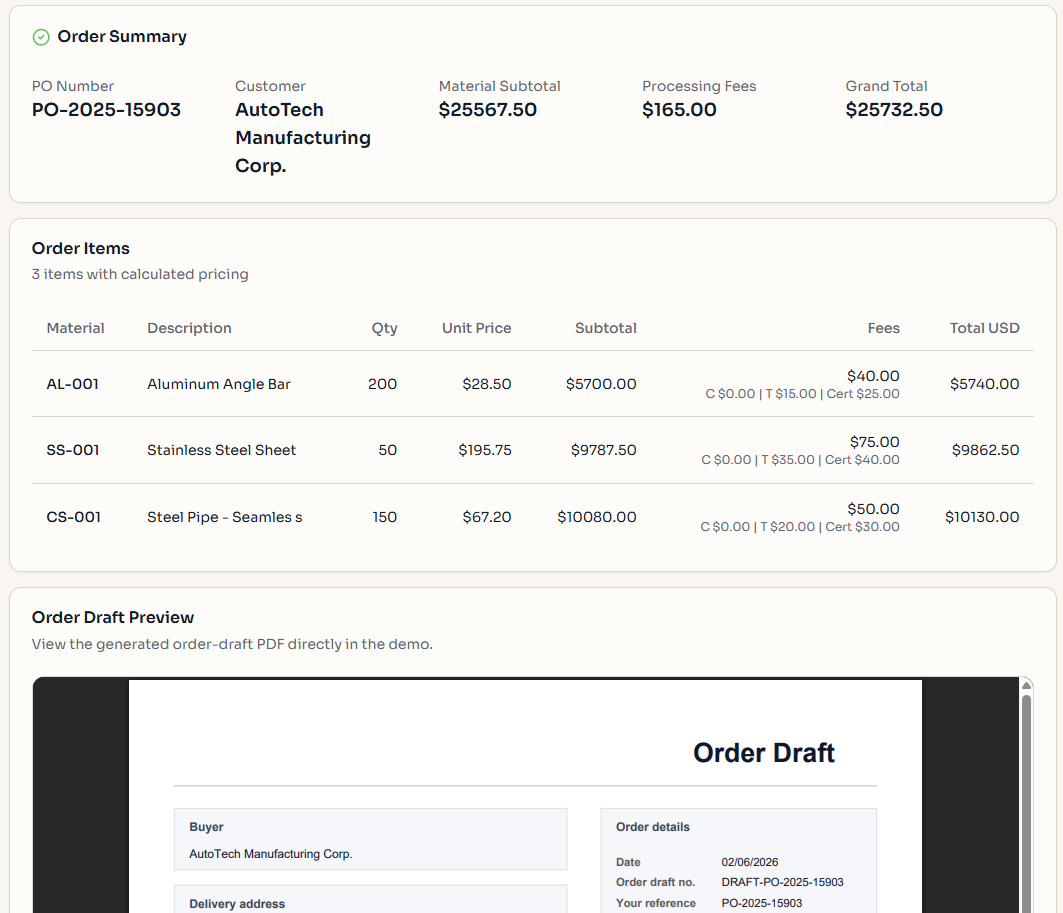
Example output from the demo — uploading a purchase order with three BOM files and a price list, then viewing the calculated order summary and generated sales order draft:

📁
implementation_layer/src/gaik/software_modules/documents_to_structured_data/📁
implementation_layer/examples/software_components/vision_extractor/
To test a smaller version of the purchase order use case, please visit the GAIK demo link. Access is available upon registration request.
Adaptable to Other Domains
The same parse → extract → match → calculate pipeline applies to any procurement or back-office workflow requiring structured extraction from multi-document inputs — only the user requirements, matching keys, and pricing logic change:
- Vendor invoice processing with line-item reconciliation, sales order intake and ERP staging, request-for-quote ingestion with cost lookup, vendor catalogue normalisation, shipment and customs documentation aggregation
Evaluation Methods
The quality of this use case is evaluated by assessing each pipeline component independently:
Parser Evaluation
Parsing quality is benchmarked across different parsers — including the simple PyMuPDF parser, Docling, and GAIK's custom multimodal parser — on purchase order documents with varying layouts, including complex tables and non-standard column arrangements. The benchmark measures how accurately each parser recovers field values and table structures from challenging document formats.
📊 Parsing evaluation methods:
evaluation_layer/eval_methods/
Extractor Evaluation
The quality of structured information extraction is evaluated using precision, recall, and F1 score — computed separately for exact-match fields (item numbers, dates, quantities) and semantic-match fields (descriptions, addresses). This measures how accurately the extracted fields match the expected values across a set of reference purchase orders.
📊 Extraction evaluation methods:
evaluation_layer/eval_methods/extraction_eval/